The WLS Mobile App has changed! We know the old app didn’t always work, and we have partnered with our vendor, Solus, on a new platform that should reduce unexpected log outs, freezes, crashes, and other hiccups.
Android Users: the new version arrives as an update to the app you already have.
If auto-updates are on in the Google Play Store, it will install on its own. If not, open the Play Store, search “WLS Mobile,” and tap Update.
iPhone & iPad Users:download a new app called Solus Library App from the App Store.
Download the new app called Solus Library App from the App Store.
Open it, type WLSMobile (one word) in the Library Code box, and tap Continue.
All Users : Logging In
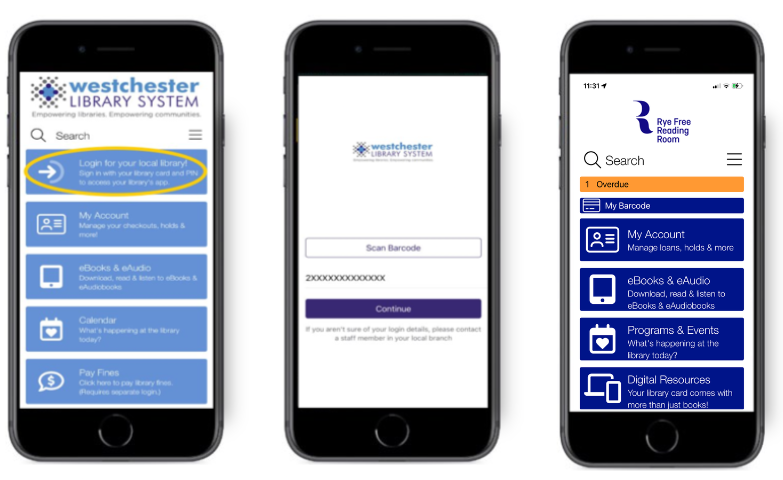
- When the app loads, you’ll see the Westchester Library System Homepage. Tap on the “Login for your local library!” Button to access your library.
- Scan the barcode on your physical library card, or type in your library card number and tap on the Continue button.
- Enter your PIN and then tap on the Login button.
- You’ll be taken to your library’s app.